
Sometimes when working with ACF repeaters, you want to reset or remove all the fields dynamically from the editor side—without refreshing the page. Here’s how I handled it with a little bit of JS.
In our small example, we have following things.
We have a repeater field and a simple checkbox, when we check that checkbox we want to remove all the fields from the repeater field.
NOTE: we are using the ACF blocks but we can do the same with any regular ACF Field.
Example GIF:
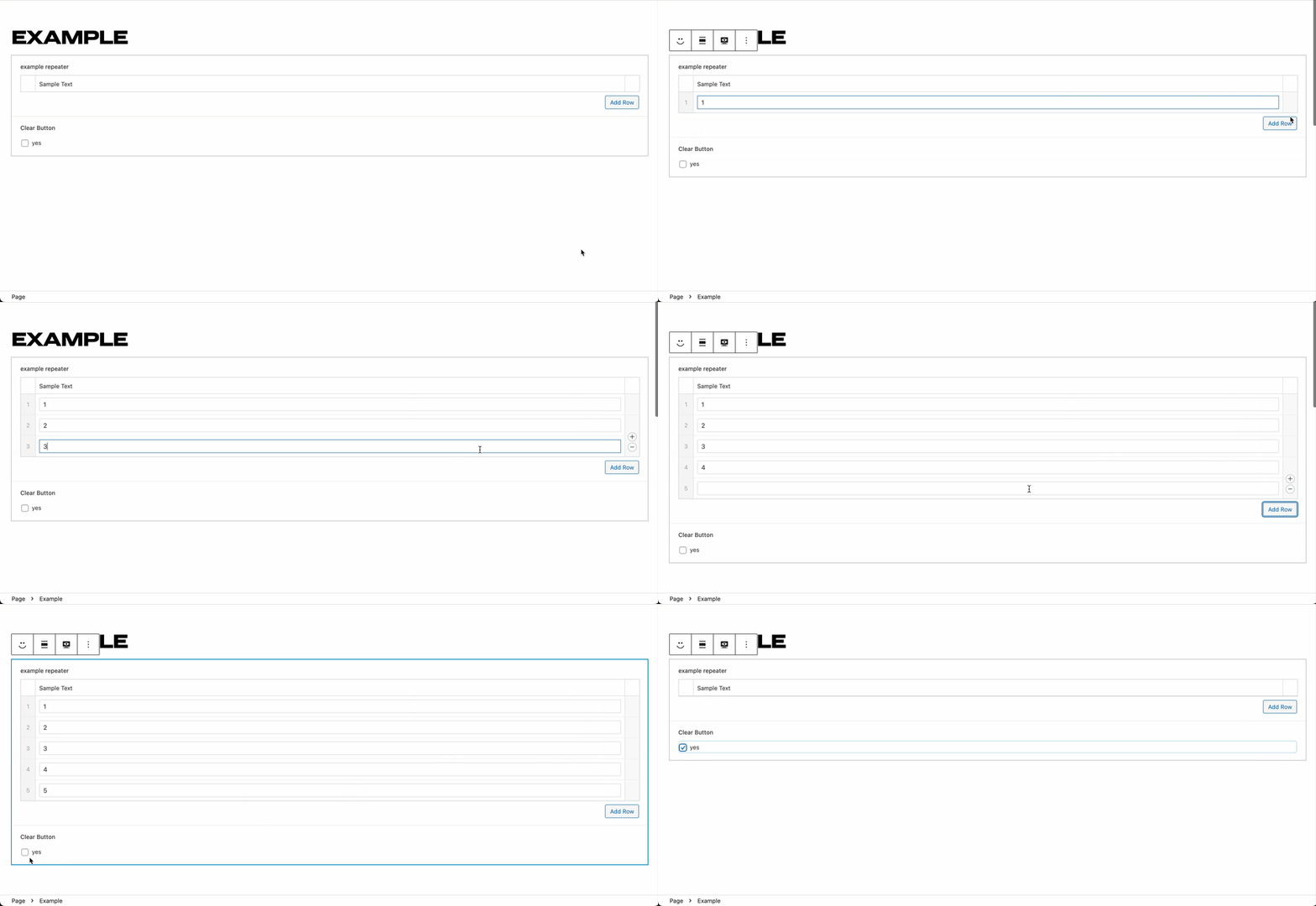
Setup
Create a basic ACF block and ACF field with some example field. one repeater field and one checkbox, if you want to copy the setup I am using, I have provided the ACF JSON file here.
{
    "key": "group_68a01534b8890",
    "title": "Example Field",
    "fields": [
        {
            "key": "field_68a0153800d75",
            "label": "example repeater",
            "name": "example_repeater",
            "aria-label": "",
            "type": "repeater",
            "instructions": "",
            "required": 0,
            "conditional_logic": 0,
            "wrapper": {
                "width": "",
                "class": "",
                "id": ""
            },
            "wpml_cf_preferences": 1,
            "readonly_setting": 0,
            "disabled_setting": 0,
            "layout": "table",
            "pagination": 0,
            "min": 0,
            "max": 0,
            "collapsed": "",
            "button_label": "Add Row",
            "rows_per_page": 20,
            "sub_fields": [
                {
                    "key": "field_68a0154600d76",
                    "label": "Sample Text",
                    "name": "sample_text",
                    "aria-label": "",
                    "type": "text",
                    "instructions": "",
                    "required": 0,
                    "conditional_logic": 0,
                    "wrapper": {
                        "width": "",
                        "class": "",
                        "id": ""
                    },
                    "wpml_cf_preferences": 2,
                    "readonly_setting": 0,
                    "disabled_setting": 0,
                    "default_value": "",
                    "maxlength": "",
                    "allow_in_bindings": 0,
                    "placeholder": "",
                    "prepend": "",
                    "append": "",
                    "disabled": false,
                    "readonly": false,
                    "parent_repeater": "field_68a0153800d75"
                }
            ]
        },
        {
            "key": "field_68a0155100d77",
            "label": "Clear Button",
            "name": "clear_button",
            "aria-label": "",
            "type": "checkbox",
            "instructions": "",
            "required": 0,
            "conditional_logic": 0,
            "wrapper": {
                "width": "",
                "class": "",
                "id": ""
            },
            "wpml_cf_preferences": 1,
            "choices": {
                "yes": "yes"
            },
            "default_value": [],
            "return_format": "value",
            "allow_custom": 0,
            "allow_in_bindings": 1,
            "layout": "vertical",
            "toggle": 0,
            "save_custom": 0,
            "custom_choice_button_text": "Add new choice"
        }
    ],
    "location": [
        [
            {
                "param": "block",
                "operator": "==",
                "value": "juzar\/example"
            }
        ]
    ],
    "menu_order": 0,
    "position": "normal",
    "style": "default",
    "label_placement": "top",
    "instruction_placement": "label",
    "hide_on_screen": "",
    "active": true,
    "description": "",
    "show_in_rest": 0,
    "acfml_field_group_mode": "translation",
    "modified": 1755322071
}
Here is the piece of code that is most important.
acf.remove( {
	target: $field, // jQuery field object which you want to remove
	action: 'remove',
	confirm: false
} );
Hooking into ACF actions
To get started, first we want to use the acf.addAction function which works similarly to the WordPress hooks, and then hook into append hook, this will be called when you add the block to page and on the initial load if it’s already there.
// Define the specific ACF block names.
const BLOCK_NAMES = [
	'juzar/example',
];

if ( window.acf && acf.addAction ) {
	acf.addAction( 'append', function( $el ) {
		if ( $el && $el.is( '.acf-block-fields' ) && BLOCK_NAMES.includes( $el.closest( '.wp-block' ).attr( 'data-type' ) ) ) {
			setTimeout( () => {
				initializeEventListeners( $el );
			}, 400 );
		}
	} );
}
Couple of things to notice in above code.
acf.addActionwill be called for all the blocks on the page separately, so that it handles multiple blocks in the same page.- `BLOCK_NAMES` is used so that we only apply this code to the block that we have created.
Adding event listeners
Now in the initializeEventListeners event, we want to hook into the clear checkbox and on the check condition we want to clear the acf fields.
/**
 * Initialize event listeners for the block.
 *
 * @param $blockWrapper
 */
function initializeEventListeners( $blockWrapper ) {
	const $clearButton = $blockWrapper.find( '.acf-field[data-name="clear_button"] input[type="checkbox"]' );

	$clearButton.on( 'change', function() {
		if ( this.checked ) {
			clearAllFields( $blockWrapper );
		} else {
			console.log( 'Clear button unchecked' );
		}
	} );
};
Because ACF JS library uses the JQuery code, we can use the same. the event listener simply works that when you check it, we want to call function clearFields.
Notice how the $blockWrapper is passed to every function, that is necessary because $blockWrapper is root element for a single block and that is necessary so that effect of the code is contained within that block in-case of multiple blocks in the same page.
Clearing repeater rows
Now the main function clearAllFields
/**
 * Clear all fields in the block.
 *
 * @param $blockWrapper
 */
function clearAllFields( $blockWrapper ) {

	const $exampleRepeater = $blockWrapper.find( '.acf-field[data-name="example_repeater"] .acf-row:not(.acf-clone)' );

	$exampleRepeater.each( function() {
		let $textField = $( this );

		if ( ! $textField ) {
			return;
		}

		acf.remove( {
			target: $textField,
			action: 'remove',
			confirm: false
		} );
	} );
}
Notice this field to find the repeater
.acf-field[data-name="example_repeater"] .acf-row:not(.acf-clone)The selector '.acf-row:not(.acf-clone)' makes sure we only target the actual rows and skip the hidden clone row that ACF uses for creating new rows
and then we loop through each field and call the function acf.remove as we noted before.
Final Code
// The Whole JS Example Code
( function( $ ) {

	// Define the specific ACF block names.
	const BLOCK_NAMES = [
		'juzar/example',
	];

	/**
	 * Clear all fields in the block.
	 *
	 * @param $blockWrapper
	 */
	function clearAllFields( $blockWrapper ) {

		const $exampleRepeater = $blockWrapper.find( '.acf-field[data-name="example_repeater"] .acf-row:not(.acf-clone)' );

		console.log( $exampleRepeater );
		$exampleRepeater.each( function() {
			let $textField = $( this );

			if ( ! $textField ) {
				return;
			}

			acf.remove( {
				target: $textField,
				action: 'remove',
				confirm: false
			} );
		} );
	}

	/**
	 * Initialize event listeners for the block.
	 *
	 * @param $blockWrapper
	 */
	function initializeEventListeners( $blockWrapper ) {
		const $clearButton = $blockWrapper.find( '.acf-field[data-name="clear_button"] input[type="checkbox"]' );

		$clearButton.on( 'change', function() {
			if ( this.checked ) {
				clearAllFields( $blockWrapper );
			} else {
				console.log( 'Clear button unchecked' );
			}
		} );
	};

	if ( window.acf && acf.addAction ) {
		acf.addAction( 'append', function( $el ) {
			if ( $el && $el.is( '.acf-block-fields' ) && BLOCK_NAMES.includes( $el.closest( '.wp-block' ).attr( 'data-type' ) ) ) {
				setTimeout( () => {
					initializeEventListeners( $el );
				}, 400 );
			}
		} );
	}

}( jQuery ) );